
Shopware: different product texts per sales channel, set up and exported
A second shop, a B2B channel or a brand of its own: often the same products should be described differently in each channel, not least because of duplicate content in Google. Shopware has no field for this, but a clean route via languages. This guide shows setup, text maintenance and export.
- In Shopware, texts belong to the language, not to the sales channel. For texts of its own, the channel therefore gets a language of its own, for example "German (B2B)".
- The new language inherits from German: empty fields show the German text, filled fields override it in this channel only.
- In the PIM you fill the language in bulk: copy, have the AI write new texts or import via CSV.
- Export per channel: CSV with columns per channel and language, feeds with sales channel and language.
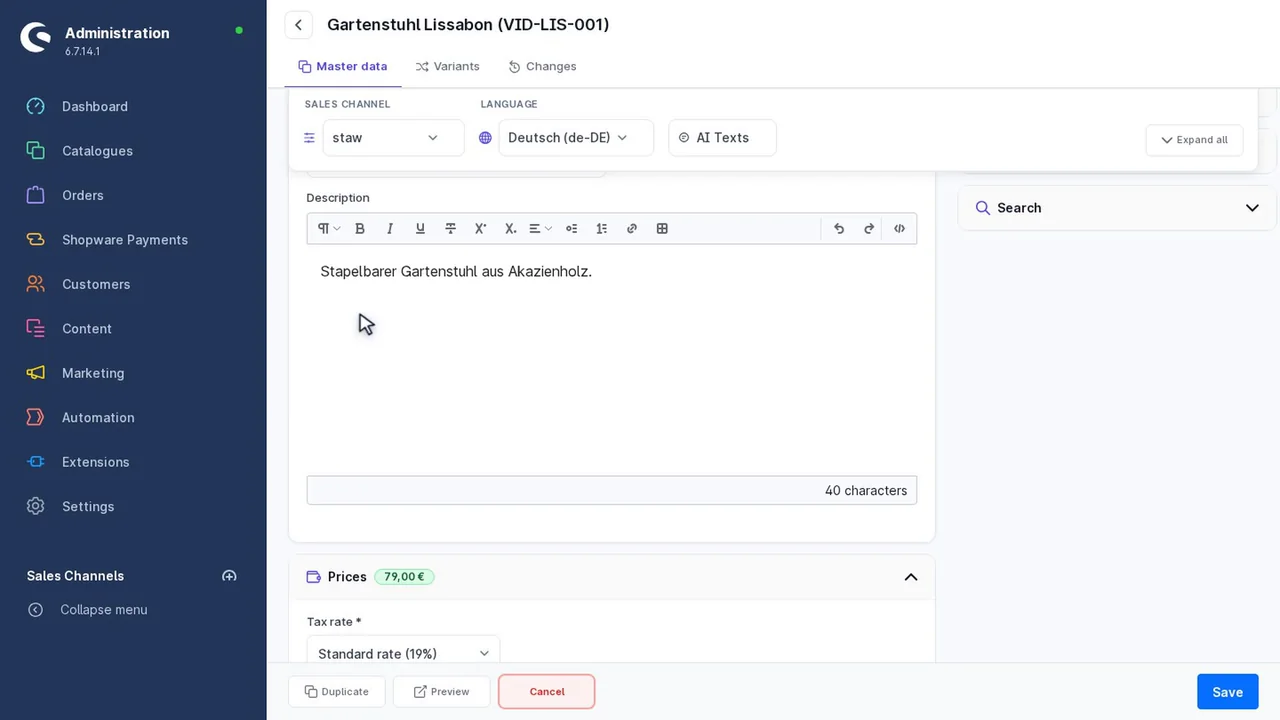
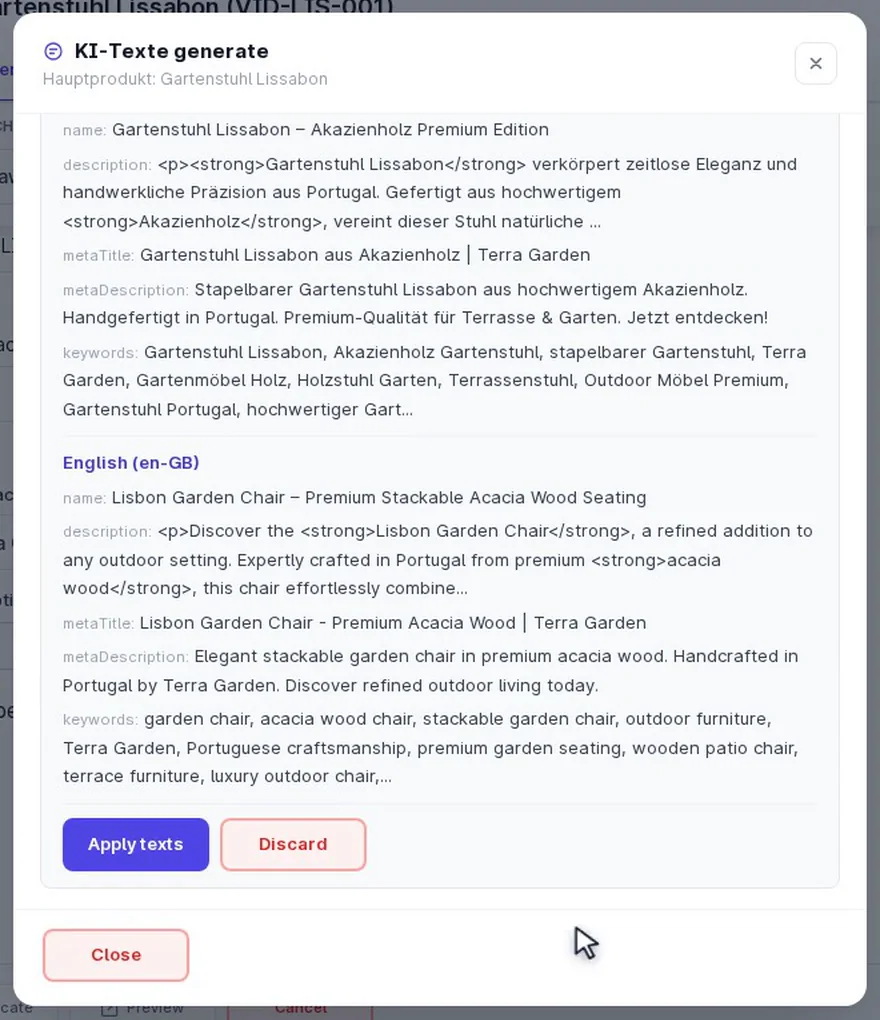
- Fill the channel language with a source text
- AI with "Individual texts per channel & language"
- Output texts per channel via CSV or feed
How it works: one language per channel
Shopware stores name, description and meta texts per language. If every channel has its own language, it also has its own texts. An example with three channels:
| Sales channel | Language | Inherits from | Texts |
|---|---|---|---|
| Main shop | German | - | source texts |
| B2B shop | German (B2B) | German | factual, with technical data |
| Second shop of a brand | German (Brand) | German | own tone, own meta texts |
Thanks to inheritance you do not have to rewrite everything. Whatever stays empty in "German (B2B)" is shown in the B2B shop from "German". You only override what should differ there, such as name, description and meta description.
Step 1: create the language in Shopware
- Settings, Languages, add language: name it for example "German (B2B)" and choose "German" for inheritance.
- Choose a locale: Shopware assigns each locale only once. If de-DE is already taken, use a free German-speaking one such as de-AT or de-CH.
- Open the sales channel: add the new language under languages, set it as the channel's default language and assign it to the domain under domains.
- Generate SEO URLs: the channel needs SEO URLs of its own for the new language. In the PIM you create them under regenerate SEO URLs, then clear the cache.
Step 2: maintain the texts in the PIM
- Copy the source text: in bulk editing, "Copy from default language" copies name, description and meta texts into the new language, free of charge and only into empty fields. With "Have the AI rework" the AI rewrites the texts along the way.
- Texts of their own via AI: with "Individual texts per channel & language", ChatGPT or Claude writes a separate text for every channel language instead of using the same one everywhere. That helps against duplicate content when several shops show the same products.
- Refine single products: in the detail view you switch the language and change only the fields that should differ in the channel.
- Find gaps: the "Missing texts per language" filter shows products where a field is missing in the new language. Inherited texts count as present.
More on AI texts: AI product descriptions for Shopware.
Step 3: export texts per channel
CSV with columns per channel and language
Which channel languages appear as columns of their own is set in the config matrix (Texts & translations, "Visible channel languages"). The export writes the main language into the normal columns and every further channel language as trans_<channel>_<language>_<field>:
productNumber;name;trans_b2bshop_de_AT_name;trans_b2bshop_de_AT_description
TABLE-160;Dining table oak 160 cm;Dining table oak 160 cm, contract version;Sturdy version for hospitality and contract use ...
You can edit the same file and import it again, for example when an agency writes the B2B texts. Per channel language there are name, description, meta title, meta description, keywords, pack unit (singular and plural) and search keywords. More: Shopware CSV import with translations.
Feeds per channel
In the feed generator you choose sales channel and language. The channel defines domain, product URL and image URLs, the language defines the texts. A dealer portal, for example, gets the feed with the B2B texts and the B2B shop's links, while Google Shopping keeps receiving the main shop's texts.
All about feeds: Create a Shopware Google Shopping feed.
With JTL-Wawi or another ERP
If an ERP such as JTL-Wawi writes the product data to Shopware again with every sync, the texts of the channel languages are gone afterwards. The external system protection in the PIM restores them automatically once you select the channel language under "Protected languages". Prices and stock keep coming from the ERP.
Step by step: JTL-Wawi and Shopware: protect product texts and languages.
Frequently asked questions
Can Shopware show different product texts per sales channel?
Not via a field of its own. Texts belong to the language. With a language of its own per channel that inherits from German, every channel gets texts of its own.
Do I have to rewrite all texts for the new channel?
No. The new language inherits from German. You only override the fields that should differ in the channel.
Why can I not choose the de-DE locale a second time?
Shopware assigns each locale only once. Use a free German-speaking one such as de-AT or de-CH for the channel language.
Why is the name empty in my feed?
The feed reads exactly the chosen language and does not inherit empty fields from German. Fill the language beforehand with "Copy from default language".
How do I export the texts of a channel?
Via CSV: every channel language released in the config matrix appears as columns of its own following the pattern trans_
Further reading
- Translate Shopware products: DeepL, AI or a copy from the default language
- Shopware CSV import with translations: all languages in one file
- PIM for multilingual Shopware shops: find and close gaps per language
- Create a Shopware Google Shopping feed: feeds per sales channel and language
- Shopware sales channel visibility: which products in which channel